
WaterCress Downloads
Original WaterCress
This is a download of the original WaterCress. Please note this version is not compatible with the new version of the model and
as such layouts created by this version cannot be run with the new WaterCress-e program. This version is no longer supported. A conversion program will be available soon.

Loading of future install downloads will update the program to the latest version without changing any projects you have developed.
Simply run setup.exe. If you have already loaded watercress you can update the program simply by replacing the executables in the watercress program
folder with those provided in the download. The main executables are watercress.exe, wcmain2h.exe and wcmain3h.exe
A full WaterCress manual is available for download below
New WaterCress-e (beta release)
This is a download of the new WaterCress-e model. It is recomended that this new version of watercress be loaded under folder c:\watercress keeping it separate from the original watercress file location. The executable watercress.exe is the initiating program for the model. Three options of download are provided.
Updated: 23/04/2025
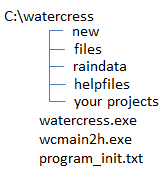
This download provides a zip file of a full layout structure of the entire program which includes all ancillary files needed to run the program and also some example projects and files. The zip file should be loaded into the folder c:\watercress to load the full folder structure required by watercress (as shown in diagram). As you create a project a folder is added to this folder list (shown here as your projects). Folders "new" and "files" contain the base data which is added to nodes as you create new projects. The folder "raindata" can be used as a central repository for timeseries files used in the projects. The folder "helpfiles" contains a series of "rtf" format help files which are referenced throughout the program. It is necessary to use this download the first time you load WaterCress.
Updated: 23/04/2025
This download provides a zip file of just the two main executables which are watercress.exe and wcmain2h.exe. It is envisaged that
the executables will be updated regularly as we develop the program further but there will be no need to alter the other folders
already loaded. They are loaded into folder c:\watercress
Updated: 23/04/2025
This download provides a zip file of companion executables and any updates of the help files. This currently includes a program to
convert the Australian BOM solar radiation file to cloud cover but other files will be added as they are developed. These are not necessary
to run watercress but may be needed depending on your use of the model.